


How to Turn Illustrator Artwork into Stitch-Ready Embroidery Designs
Embroidery is a great way to bring art to life on fabric. Many brands use embroidery on shirts, hats, bags, and uniforms. But before a design can be stitched by a machine, it must be prepared in the...

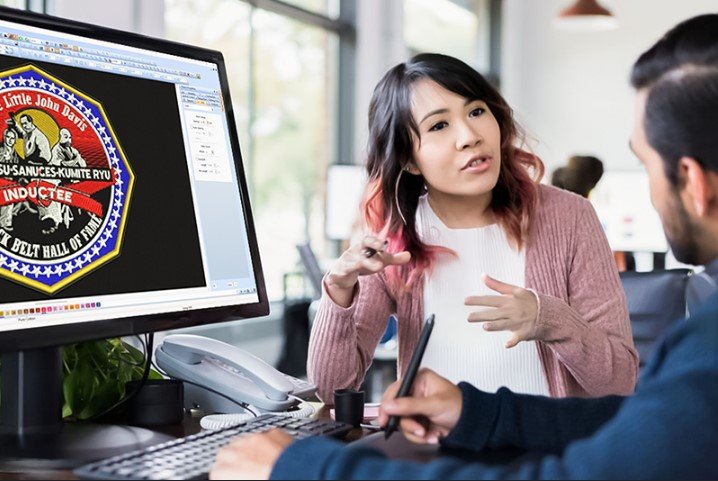
Embroidery is a great way to bring art to life on fabric. Many brands use embroidery on shirts, hats, bags, and uniforms. But before a design can be stitched by a machine, it must be prepared in the right way. A normal graphic file will not work for embroidery machines.Many designers create logos and artwork in Adobe Illustrator. Illustrator is a strong tool for vector graphics. But these files must go through a special process before they become embroidery files. Many businesses Convert Adobe Illustrator Files to Embroidery Formats so that machines can read the design and stitch it properly.
Table Of Content
- Understanding the Difference Between Vector Art and Embroidery Files
- What Is Illustrator Artwork?
- What Is an Embroidery File?
- Why Illustrator Artwork Is Perfect for Embroidery
- Clean Lines and Shapes
- Easy to Edit
- High Quality Artwork
- The Process of Turning Illustrator Artwork into Embroidery Designs
- Step 1: Review the Artwork
- Check Design Details
- Adjust Design Size
- Step 2: Simplify the Design
- Remove Tiny Details
- Adjust Line Thickness
- Step 3: Choose the Right Stitch Types
- Satin Stitches
- Fill Stitches
- Running Stitches
- Step 4: Plan Stitch Direction
- Why Stitch Direction Matters
- Avoid Fabric Pull
- Step 5: Add Underlay Stitches
- Purpose of Underlay
- Step 6: Set Stitch Density
- Balanced Density Is Important
- Step 7: Assign Thread Colors
- Step 8: Test the Design
- Sample Stitching
- Common Mistakes When Preparing Artwork for Embroidery
- Using Low Quality Artwork
- Too Many Small Details
- Ignoring Fabric Type
- Experience Matters in Embroidery Digitizing
- Benefits of Professional Digitizing
- Better Stitch Quality
- Faster Production
- Consistent Results
- Tips for Getting the Best Embroidery Results
- Use Simple Shapes
- Choose Strong Colors
- Keep Text Readable
- Work with Skilled Digitizers
- The Future of Digital Embroidery
- Final Thoughts
In this guide, we will explain the full process. You will learn how Illustrator artwork becomes stitch-ready embroidery designs. We will also share tips from real experience to help you get clean and professional results.
Understanding the Difference Between Vector Art and Embroidery Files
Before we start the process, it is important to know the difference between normal artwork and embroidery files.
What Is Illustrator Artwork?
Adobe Illustrator creates vector graphics. Vector graphics use lines and shapes instead of pixels.
These files are great for:
- Logos
- Branding designs
- Icons
- Digital artwork
Vector files can be resized without losing quality.
What Is an Embroidery File?
An embroidery file is very different. It is not just an image.
It is a file that gives instructions to an embroidery machine.
These instructions include:
- Stitch type
- Stitch direction
- Stitch order
- Thread colors
- Stitch length
The machine reads this information and stitches the design on fabric.
Because of this, artwork must be converted into stitch instructions.
Why Illustrator Artwork Is Perfect for Embroidery
Vector artwork is a great starting point for embroidery.
Clean Lines and Shapes
Illustrator designs use smooth lines and curves. This makes it easier to plan stitches.
Clean shapes help digitizers create accurate stitch paths.
Easy to Edit
Designers can adjust:
- Colors
- Shapes
- Size
before the design is prepared for embroidery.
High Quality Artwork
Vector files stay sharp at any size. This helps maintain design quality during digitizing.
The Process of Turning Illustrator Artwork into Embroidery Designs
Turning artwork into embroidery is called digitizing.
Digitizing means converting artwork into stitches.
Let’s look at the steps used by professionals.
Step 1: Review the Artwork
The first step is to review the Illustrator design carefully.
Check Design Details
The digitizer studies the design to see:
- Small text
- Thin lines
- Complex shapes
Some details may need to be simplified for embroidery.
Adjust Design Size
Embroidery designs must match the size of the product.
For example:
- Cap logos are small
- Jacket designs are larger
The artwork is scaled to the correct size before digitizing begins.
Step 2: Simplify the Design
Not every graphic detail works well in embroidery.
Remove Tiny Details
Very small shapes may not stitch clearly.
Digitizers may remove or combine small elements.
Adjust Line Thickness
Lines that are too thin may disappear during stitching.
They may need to be thickened for embroidery.
Step 3: Choose the Right Stitch Types
Embroidery uses different types of stitches.
Each stitch type works best for certain areas.
Satin Stitches
Satin stitches are used for:
- Text
- Borders
- Smooth shapes
They create a shiny and clean finish.
Fill Stitches
Fill stitches cover large areas.
They create texture and strong coverage.
Running Stitches
Running stitches are used for thin lines and small details.
The digitizer selects the right stitch type for each part of the design.
Step 4: Plan Stitch Direction
Stitch direction is very important in embroidery.
Why Stitch Direction Matters
Stitches reflect light in different ways.
Changing stitch direction can create depth and texture.
Avoid Fabric Pull
Proper stitch direction also helps prevent fabric distortion.
This keeps the design neat and balanced.
Step 5: Add Underlay Stitches
Underlay stitches are hidden stitches placed under the main stitches.
Purpose of Underlay
Underlay helps:
- Stabilize the fabric
- Support top stitches
- Improve design shape
Without underlay, designs may look uneven.
Professional digitizers always plan underlay carefully.
Step 6: Set Stitch Density
Stitch density means how close stitches are placed.
Balanced Density Is Important
Too many stitches can cause:
- Thread breaks
- Thick designs
- Fabric puckering
Too few stitches may leave gaps.
Digitizers adjust stitch density to create smooth results.
Step 7: Assign Thread Colors
Embroidery machines follow color instructions.
The digitizer assigns thread colors based on the original artwork.
This ensures the stitched design matches the original design as closely as possible.
Step 8: Test the Design
Before production, the design should always be tested.
Sample Stitching
A sample stitch test shows how the design performs on real fabric.
This step helps detect issues such as:
- Stitch gaps
- Misalignment
- Thread breaks
The digitizer may adjust the design after testing.
Common Mistakes When Preparing Artwork for Embroidery
Many beginners make simple mistakes when converting designs.
Using Low Quality Artwork
Poor artwork makes digitizing difficult.
Always start with clear vector files.
Too Many Small Details
Small elements may not stitch well.
Simple designs often produce better embroidery.
Ignoring Fabric Type
Different fabrics behave differently.
Digitizers must adjust the design based on the material.
Experience Matters in Embroidery Digitizing
Digitizing is both a technical skill and an art.
Software can help, but human expertise is essential.
Professional digitizers understand:
- Stitch behavior
- Fabric movement
- Machine limitations
This real experience helps create high-quality embroidery designs.
Companies like Embroidery Digitizing Services in USA – Digitizing Buddy have experienced digitizers who know how to prepare Illustrator artwork for embroidery machines.
Benefits of Professional Digitizing
Many businesses choose professional digitizing services.
Better Stitch Quality
Experts create clean stitch paths that produce smooth embroidery.
Faster Production
Well-digitized designs run smoothly on embroidery machines.
This reduces machine stops and thread breaks.
Consistent Results
Professional files produce consistent results for large orders.
For example, Embroidery Digitizing Services in USA – Digitizing Buddy focuses on creating high-quality embroidery files that help businesses achieve reliable stitching results.
Tips for Getting the Best Embroidery Results
Here are some helpful tips when preparing Illustrator designs for embroidery.
Use Simple Shapes
Clean shapes work better for embroidery machines.
Choose Strong Colors
Bold colors often look better in stitched designs.
Keep Text Readable
Small text can be difficult to stitch.
Make sure letters are large enough.
Work with Skilled Digitizers
Expert digitizers understand how to turn artwork into stitches efficiently.
Trusted companies such as Embroidery Digitizing Services in USA – Digitizing Buddy help businesses convert digital artwork into professional embroidery designs.
The Future of Digital Embroidery
Embroidery technology continues to grow. Machines are becoming faster and more advanced.
However, the quality of embroidery still depends heavily on digitizing.
Clean and well-planned embroidery files will always be important for achieving professional results.
Designers who understand the digitizing process can create better embroidery-friendly artwork.
Final Thoughts
Turning Illustrator artwork into stitch-ready embroidery designs requires careful planning and expertise.
The process includes reviewing the design, simplifying details, choosing the right stitches, planning stitch direction, and testing the final design.
When done correctly, this process transforms digital artwork into beautiful embroidered designs.
Clean digitizing ensures smooth stitching, fewer machine issues, and high-quality embroidery results.
Whether you are creating designs for apparel, promotional products, or branding items, proper embroidery digitizing is the key to achieving professional and reliable embroidery outcomes.




No Comment! Be the first one.