





Did you know that the average page on the dark web takes over ten times longer to load than a standard website? If you feel like your browser is stuck in the dial up era while trying to find information, you are not alone. The way the Tor network routes your data through three different layers of servers creates a natural delay. In this guide, you will learn which tools actually respect your time and how to find what you need without staring at a blank screen.
Top Content
- Quick Answer – Fastest Search Options
- What is a Fastest Dark Web Search Engine?
- Why Speed is Often Low on Onion Sites
- 7 Fastest Dark Web Search Engines
- Torch
- Ahmia
- Haystak
- DuckDuckGo (Onion Version)
- Excavator
- Sentient
- Recon
- How to Improve Your Search Experience
- Common Search Problems & Fixes
- Pro Tips for Dark Web Navigation
- Safety & Best Practices
- Related Guides
- FAQ
- Q1 – Is there a dark web search engine as fast as Google?
- Q2 – Why do some search engines show “Connection Timed Out”?
- Q3 – Are these search engines safe to use without a VPN?
- Q4 – Which engine is best for finding active onion links?
Quick Answer – Fastest Search Options
The fastest dark web search engines in 2026 are Torch and Ahmia because they use lightweight indexes that load almost instantly. Many delays happen because of high node congestion or heavy site scripts. To get the best speed, use a clean dark web directory to skip the search process entirely when possible.
What is a Fastest Dark Web Search Engine?
A fast dark web search engine is a specialized tool that indexes .onion domains and allows you to find content across the Tor network quickly. Compared to Google, these tools do not track your history or use heavy advertising scripts that slow down your connection. They work by “crawling” the hidden web, which is a difficult task because many onion sites go offline frequently. People use these engines to find hidden use cases, research privacy topics or locate specific forums.
Why Speed is Often Low on Onion Sites
- Multi-layered Routing
Your request bounces through three different global nodes, which increases the physical distance data must travel. - Old Server Hardware
Many onion sites run on private home servers or low power devices that cannot handle many visitors right away. - Heavy Scripting
Sites that use too much Javascript or large images struggle to load over the narrow bandwidth of the Tor network. - Circuit Congestion
Sometimes the specific path your browser picks is busy, making even the best engines feel sluggish.
7 Fastest Dark Web Search Engines
Torch
Torch is one of the oldest and most responsive search tools on the Tor network. It has a massive index of over a million pages but keeps the interface very simple to ensure rapid loading.
Fix
If results feel outdated, try using the “sort by date” feature to find active links.
Ahmia
This engine is unique because it filters out “trash” content and focuses on high quality links. It is very fast because it does not use heavy graphics on the results page.
Fix
Use specific keywords to narrow down the results, as Ahmia is very precise.
Haystak
Haystak claims to have indexed billions of pages, making it a giant in the space. The search speed is impressive despite the huge amount of data it handles.
Fix
Upgrade to their premium version if you need advanced filters like “system version” or “historical data”
DuckDuckGo (Onion Version)
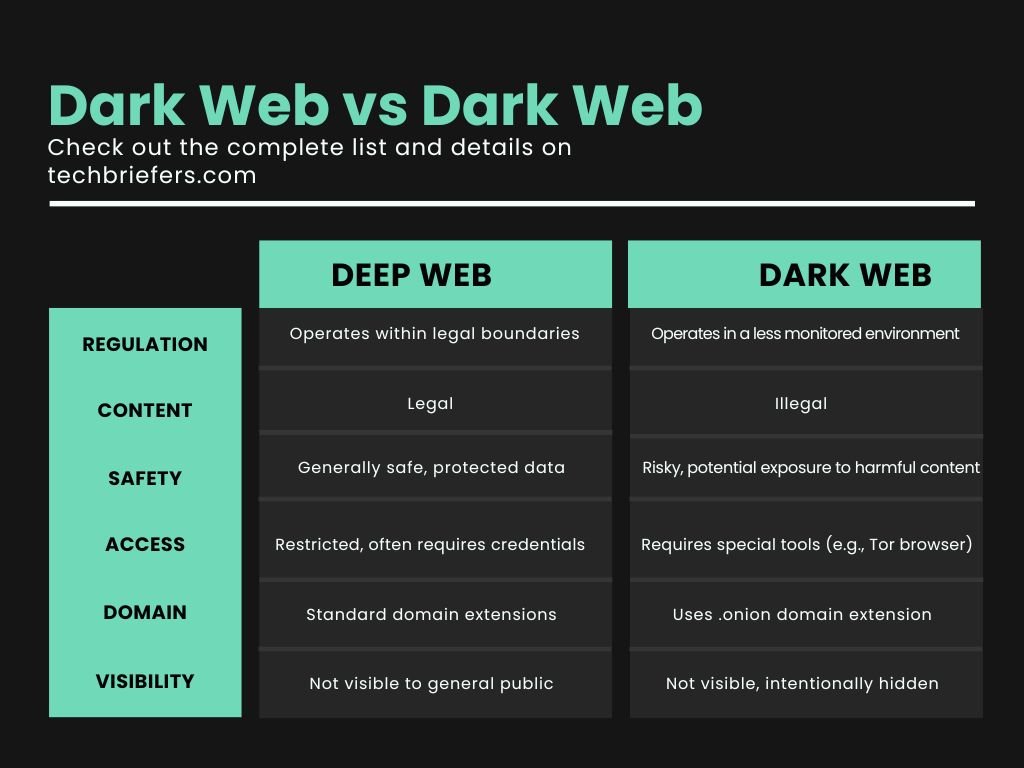
While known for the clearnet, DuckDuckGo has an onion presence that helps you bridge the gap between dark web vs deep web content. It is extremely reliable and fast.
Fix
Use this when you need standard information but want to keep your search private from your ISP.
Excavator
Excavator is a popular choice for those looking for specialized marketplaces or technical data. It is built for speed and privacy, with zero logging of your queries.
Fix
If the site does not load, check your Tor circuit and request a “New Identity” in your browser.
Sentient
Sentient is a newer engine that uses modern crawling tech to keep its links fresh. It loads faster than many older engines because it prunes dead links every few hours.
Fix
Bookmark the exact onion URL to avoid landing on “mirror” sites that might be slower.
Recon
Recon is the best tool if you are looking for services or products. It aggregates data from various sources to show you where the active communities are.
Fix
Use Recon specifically for cross referencing vendors or checking the Dread forum status.
How to Improve Your Search Experience
- First
Check your base internet connection – If your home Wi-Fi is slow, Tor will be even slower. - Next
Use a verified top search engine list to ensure you are using current URLs. - Finally
Adjust your security slider in the Tor Browser. Setting it to “Safer” instead of “Safest” can sometimes speed up page rendering, though it carries more risk.
Common Search Problems & Fixes
Problem
The search engine takes over 60 seconds to respond.
Fix
Click the “Shield” icon next to the URL bar and select “New Tor Circuit for this Site” to find a faster path.
Problem
All the links in the search results are dead.
Fix
The dark web changes daily – Use a dedicated trends guide to see what sites are currently popular and active.
Problem
I cannot find the specific forum I am looking for.
Fix
Check the Dread forum fix guide if you are having trouble with specific community access.
Pro Tips for Dark Web Navigation
- Use Direct Links
Search engines are good but a direct Piranha Market link is always faster than searching for it. - Avoid Peak Hours
Tor usage spikes during evening hours in the US besides Europe. Try searching during “off” hours for better speeds. - Disable Background Apps
Close any heavy apps like Spotify or Steam to give the Tor browser more of your computer’s processing power.
Safety & Best Practices
Searching the dark web is safe if you follow simple rules – Never download files from a search engine result unless you know the source. Always use PGP encryption when communicating with anyone you find through the tools. Remember that search engines index everything, including things that might be harmful – use your own judgment before clicking.
Related Guides
- Dark Web Search Engines for Beginners
- Common Problems with Onion Search Tools
- Best Tools for Safe Tor Access
FAQ
Q1 – Is there a dark web search engine as fast as Google?
No engine on the dark web is as fast as Google because the Tor network must route data through three different servers – this process always adds a few seconds of lag.
Q2 – Why do some search engines show “Connection Timed Out”?
This usually means the search engine’s server is currently down or the Tor node you are using is blocked. Try changing your circuit or waiting ten minutes before trying again.
Q3 – Are these search engines safe to use without a VPN?
The Tor Browser is designed to be used alone – While some people use a VPN, it is not always necessary and can sometimes slow down your connection even more.
Q4 – Which engine is best for finding active onion links?
Ahmia & Torch are currently the best for active links – They have the most consistent crawlers that remove dead sites from their lists more frequently than others.
Finding your way around the hidden web does not have to be a slow and frustrating experience. By choosing the right dark web search engines and following the speed tips above, you can save a lot of time. Stay safe, be patient with the network and enjoy your exploration.