


Change Signature in PAN Card & Check PAN Details by Number
Your Permanent Account Number (PAN) is a critical identifier issued by the Income Tax Department. It plays a vital role in financial transactions, tax payments, and serves as key identification....

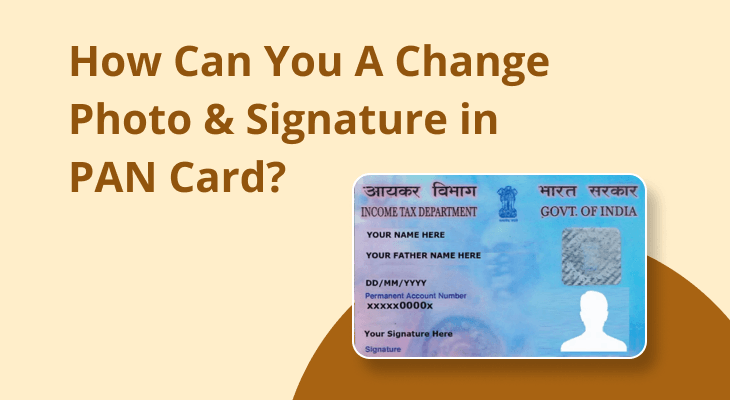
Your Permanent Account Number (PAN) is a critical identifier issued by the Income Tax Department. It plays a vital role in financial transactions, tax payments, and serves as key identification. However, there may be instances where the signature on your PAN card is outdated, incorrect, or requires updating due to legal reasons. Similarly, you may need to verify your PAN details via your PAN number for personal or official purposes. This article provides a clear guide on how to change the signature in PAN card and explains how to efficiently check PAN details by PAN number.
Table Of Content
- Why Is It Important to Update Your Signature on PAN Card?
- How to Change Signature in PAN Card
- Online Method
- Step 1: Visit the Official NSDL or UTIITSL Website
- Step 2: Select ‘PAN Card Correction’ Option
- Step 3: Fill Out the Application Form
- Step 4: Provide Supporting Documents
- Step 5: Pay the Required Fee
- Step 6: Submit the Application
- Offline Method
- Step 1
- Step 2
- Step 3
- Step 4
- How to Check PAN Details by PAN Number
- Steps to Check PAN Details
- Step 1: Visit the Official Income Tax Portal
- Step 2: Navigate to PAN Verification Section
- Step 3: Enter the PAN Number
- Step 4: Authenticate Using Captcha Code
- Step 5: Review PAN Details
- Common Documents Required for PAN Changes
- Benefits of Updating Your PAN Card Details
- FAQs
- Q1: Can I change my signature in the PAN card online?
- Q2: How long does it take to update the signature on a PAN card?
- Q3: What documents are required for signature updates in a PAN card?
- Q4: How can I verify my PAN details using PAN number?
- Q5: Is there a fee for updating the PAN card signature?
- Final Thoughts
- Call to Action
Why Is It Important to Update Your Signature on PAN Card?
Your PAN card is a legal document used for tax filings, accessing financial services, and identity verifications. If your signature does not match what’s on record during any transaction or process, it could lead to complications such as document rejection or authentication failure. To prevent this issue, updating your PAN card signature is essential.
If you’ve faced problems related to mismatched signatures or need to update your PAN details, follow the steps below for hassle-free corrections.
How to Change Signature in PAN Card
How to change signature in pan card, Changing your signature on a PAN card is a straightforward process provided you follow the appropriate steps. The Income Tax Department enables changes to PAN details, including signatures, through both online and offline methods.
Online Method
Step 1: Visit the Official NSDL or UTIITSL Website
Go to the PAN Correction form section available on either the NSDL e-Governance Infrastructure Limited or UTI Infrastructure Technology and Services Limited website.
Step 2: Select ‘PAN Card Correction’ Option
Choose the option specifically meant for corrections in PAN, including signature change.
Step 3: Fill Out the Application Form
- Enter the required PAN details like PAN number, name as per records, DOB, and contact details.
- Ensure to check the box labeled Signature Mismatch/Correction.
Step 4: Provide Supporting Documents
- Upload proof of identification such as Aadhaar Card, voter ID, or passport for signature verification.
- Submit a scanned copy of your new and authentic signature on white paper.
Step 5: Pay the Required Fee
Pay a nominal fee for processing your application. Fees vary slightly for residents and non-residents.
Step 6: Submit the Application
Once all steps are completed, submit the application form. You’ll receive an acknowledgment number to track your application status.
Offline Method
Step 1
Obtain the PAN correction form from your local TIN-Facilitation Center or download it online.
Step 2
Fill out the form manually, ensuring to tick the appropriate box for signature correction.
Step 3
Affix your latest photograph and sign in the designated space. Attach required documents like proof of identity and signature verification.
Step 4
Submit the form to the nearest PAN processing center along with the applicable fee.
How to Check PAN Details by PAN Number
Sometimes, you may need to cross-check the PAN card details for accuracy or official needs. This can be done effortlessly by using your PAN number.
Steps to Check PAN Details
Step 1: Visit the Official Income Tax Portal
Access the Income Tax Department’s official portal, which provides a PAN verification tool.
Step 2: Navigate to PAN Verification Section
Click on the section that allows users to verify PAN card details.
Step 3: Enter the PAN Number
Input your PAN number into the provided field. Ensure you type in the correct PAN ID to avoid errors.
Step 4: Authenticate Using Captcha Code
Complete the CAPTCHA verification for security purposes.
Step 5: Review PAN Details
Post verification, the portal will display details such as the name of the cardholder, jurisdiction, and PAN card status.
This process is particularly useful for verifying PAN details for financial transactions, filing income tax returns, or resolving discrepancies.
Common Documents Required for PAN Changes
To process the change in your signature or verify PAN details, certain documents are mandatory:
- ID Proof: Aadhaar Card, Passport, Voter ID, Driving License
- Address Proof: Utility bills, domicile certificate, or Aadhaar
- Proof of Age: Birth certificate, matriculation certificate, or passport
- Recent Photograph
- Scanned signature (for online applications)
Ensure all documents are self-attested before submission.
Benefits of Updating Your PAN Card Details
- Avoids unnecessary delays or errors during financial transactions.
- Ensures smooth processing of official documents.
- Prevents signature mismatch issues during authentication or verification.
- Legally aligns your PAN card with your current details.
Timely updates to your PAN card, including signature corrections, improve its usability and authenticity, ensuring a hassle-free experience.
FAQs
Q1: Can I change my signature in the PAN card online?
Yes, you can make corrections to your signature online by visiting the NSDL or UTIITSL website and submitting the correction form along with the necessary documents.
Q2: How long does it take to update the signature on a PAN card?
Typically, it takes 7-15 working days for the correction process to be completed after submission.
Q3: What documents are required for signature updates in a PAN card?
You will need ID proof, address proof, proof of age, and a scanned copy of your updated signature.
Q4: How can I verify my PAN details using PAN number?
You can use the PAN number verification tool available on the official Income Tax portal to check your details.
Q5: Is there a fee for updating the PAN card signature?
Yes, a nominal fee is applicable. The amount depends on whether the application is domestic or international.
Final Thoughts
Updating your PAN card details, including changing the signature, is essential to maintain accuracy in financial and legal matters. By following the steps above, you can seamlessly correct your signature or verify PAN details by PAN number in a hassle-free manner.
Keep your PAN card updated to prevent authentication failures and ensure smoother transactions. For more details on PAN card corrections, visit the official Income Tax Department website or contact their support services.
Call to Action
Make your PAN card corrections today to ensure accuracy and hassle-free financial transactions. Visit the Income Tax Department official website for updates or consult registered services—including through platforms like Bajaj Finserv—to assist you with the process.





No Comment! Be the first one.